Your production process. Connected from plan to floor.
Make the product definition, material plan and production activity work together. Give planners, buyers and operators a practical way to handle the detail their jobs require.
Work through the manufacturing cycle
Keep the important detail connected.
01 / Define
Product & process
Establish bills of material, revisions, effective dates and routings for the work ahead.
02 / Plan
Materials & supply
Review demand and supply, investigate shortages and act on MRP messages.
03 / Execute
Orders & operations
Approve and release manufacturing orders, then report work through the shop-floor workflow.
04 / Review
Progress & costs
Review quantities and production cost categories in the context of the order.
Planning that leads to a decision
Give the planner something to act on.
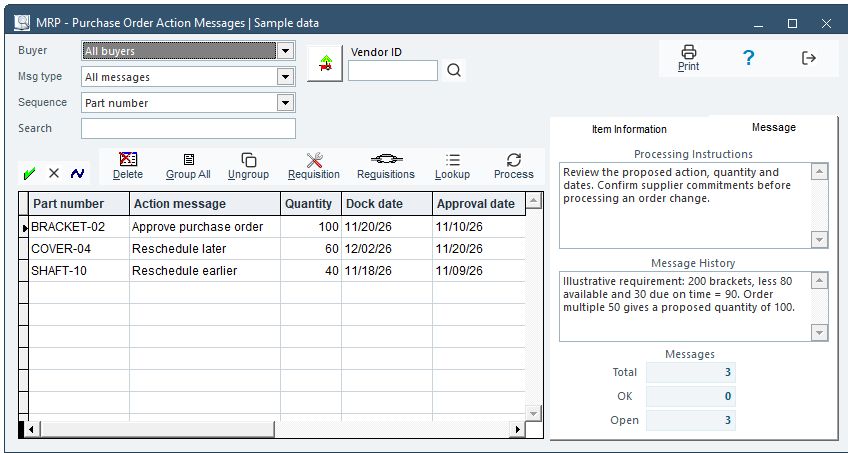
MAGI’s MRP action review connects requirements with purchasing, manufacturing and customer-demand records.
Make the demonstration concrete: a late purchase order, a changed customer requirement or a shared component. Have your planner explain the decision and follow its consequences.
Actual MAGI MRP screen in Modern mode, using synthetic demonstration records. Captured Nov. 15, 2026; illustrates the review screen, not a live planning run. Open full-size screenshot ↗
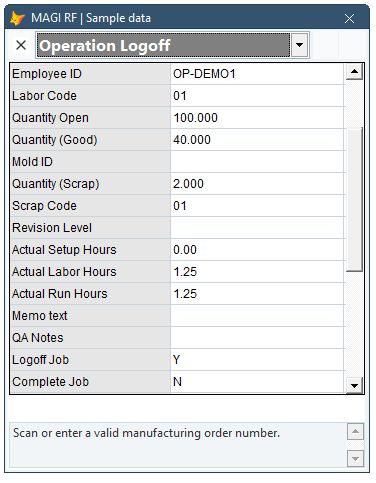
Actual operator RF interface · Modern mode Synthetic sample · Nov. 15, 2026
The operator’s workflow
Report the work where it happens.
Operation Logon and Logoff identify the employee, job and operation. Configured processing uses logon/logoff information; operators can report production and scrap.
Practical shop-floor work
Let the transaction follow the task.
The RF workflow can be adapted around the operator’s inputs and the processing your operation needs.
Look at what the operator scans, what the application supplies, what they enter and how exceptions are handled. Keep the business controls behind the sequence.
Evaluate BOM revision control, engineering-change approvals and effectivity in manufacturing ERP, including the decisions needed for open orders and existing stock.
Evaluate manufacturing costing through material, labor, overhead and outside-service costs. Ask the ERP to explain a variance, not just display a total.