
Live application customization
We customize MAGI
to fit your business.
Consultants and trained customer employees can adapt the running application through MAGI’s built-in configuration and customization tools. Start with the workflow—not just the appearance of a screen.
Change the work your people do
Meaningful changes.
Maintained by people
who understand the process.
Adapt supported inputs, sequence and processing as the business changes. Keep ownership and the applicable business controls clear.
Shop-floor & RF transactions
Shape what the operator scans or enters, in what order, and which existing processing runs at the appropriate step.
Inventory, picking & shipping
Fit supported transaction definitions to how material moves, stock is picked and orders reach staging.
Order responsibilities
Work through submission, approval and release using the applicable configuration, authorized roles and native controls.
Information & navigation
Adapt supported layouts, terminology, menus and reports to support the work. These are part of the fit, alongside the operational sequence.
A working example / RF picking
Choose the staging lane first.
Process the pick at the final quantity.
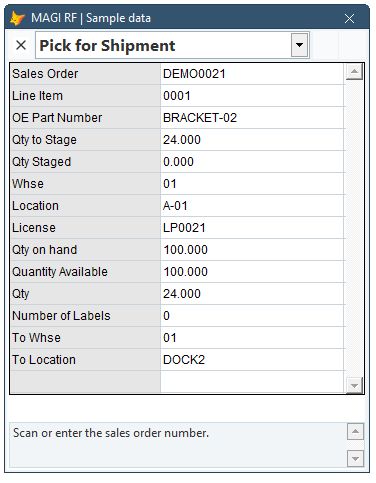
Consider a warehouse that assigns the lane before the picker reaches the stock. We changed the transaction definitions in an isolated running MAGI session to match that sequence.
Before / Destination last
After / Destination first
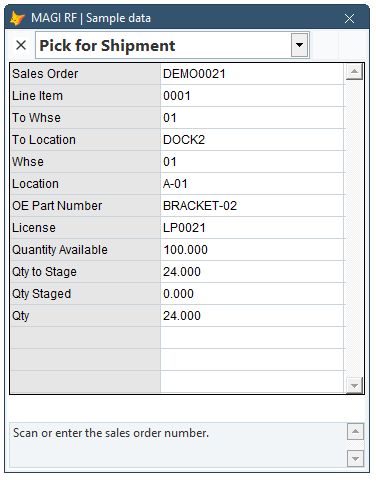
The same running form reloaded the definitions. No application rebuild or restart was needed. Wrong-item and excessive-quantity attempts were rejected before the valid 24-unit pick was processed from an initial sample stock of 100.
Actual MAGI Modern RF screens with synthetic data, captured November 16, 2026. This isolated demonstration verifies the sequence, native item/quantity checks, stock movement and staged order allocation. Configuration-editor interaction, production security/audit integration, final shipment/carrier posting and physical handheld acceptance were outside the fixture.
Maintain the fit
Give your team ownership.
Keep MAGI’s expertise close.
Train the people who will maintain supported changes. Agree on which adjustments they own and when to involve a MAGI consultant.
When does a change take effect?
It depends on the definition and the view using it. In the RF example, the running form reloaded the updated definitions in the same session. Verify the applicable reload or refresh for each change.
Does every change avoid development?
No. MAGI provides substantial live configuration and customization, but configured expressions and user exits can require deeper product knowledge. A genuinely new operation may need separately scoped development.
What stays with the workflow?
Applicable permissions, validations, approvals and posting behavior must remain part of the process. The demonstration should include a meaningful exception and the resulting records, not just a changed screen.
A demonstration built around your business
Show us how your team needs to work.
Bring the input sequence, the processing rule and an exception. See what can be maintained through MAGI’s live tools.